
The problem we set out to solve
When someone at Defra has an idea for how to use artificial intelligence (AI), how do they know if AI is suitable, and who can help? We built two connected features in the Defra AI digital toolkit. The first, “Check if AI is right for your idea”, helps people assess their ideas. The second, 'Ask the Toolkit', answers questions using the toolkit’s own guidance.
Here, I’ll explain how we designed the Ask assistant to help people find guidance, check answers and get support when they need it.
See Ask the Toolkit in action
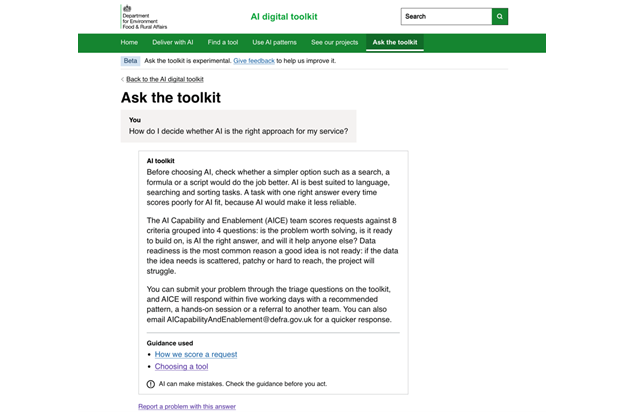
Here’s how it works in practice. We asked, “How do I decide whether AI is the right approach for my service?” The answer suggests checking whether a simpler option, such as a search, a formula or a script, would do the job better. It also explains how the AI Capability and Enablement team scores requests.
We then asked a follow-up: “Can you give me an example of a good and a bad use case?” The assistant understood we were still talking about AI suitability. It gave examples from the toolkit’s pilots, such as checking expenses claims against policy. It also explained what makes a poor fit: tasks with one right answer every time, or where the data is hard to reach.
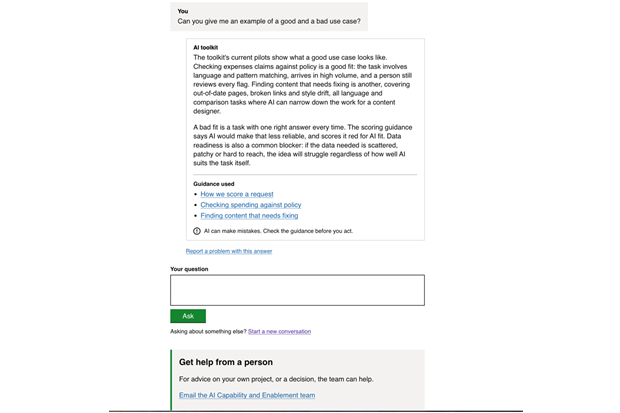
Each answer ends with “Guidance used” links to the toolkit pages it drew on, so people can check the source. It also reminds them that AI can make mistakes and offers a way to report a problem or get help from a person.
Check the answer against the source
Our guiding principle was that giving a wrong answer about a rule is the failure that matters most. An AI language model can sound confident while explaining a policy incorrectly. So, we check its answer before showing it to the user.
We run two checks first. We remove any source link that does not point to a page provided by our service. We also check quoted rules against the source page. A quotation only appears if its exact words are on that page. If the model has used different words, we remove the quotation and show a plain explanation with a link instead.
Sometimes that means a less impressive answer, and that’s deliberate. We would rather show less information than present a rewritten explanation as the policy’s own wording.
Designing for when things go wrong
We designed the difficult cases first, because that’s where trust is won or lost. The assistant has a separate heading and message for each outcome: answered, needs more detail, cannot answer, talk to a person, blocked and error.
Wording mattered more than we expected. When a question is blocked, we avoid words like “flagged” or “filtered”. These can sound like an accusation to someone unfamiliar with the technology.
Feedback from people who tested the service helped us improve the wording. “The toolkit does not cover this yet” left people stuck. The message now encourages them to contact the AI Capability and Enablement team.
We also changed what happens when an answer fails. The user sees an error message at the top of the page, and their question stays in the box. We do not add the failed answer to the conversation.
Small details that carry weight
Several changes I'm proudest of are tiny:
- Page titles: We stopped putting the question in the browser tab title. We now use “Answer 2 of 3” to tell people where they are. Error messages have titles beginning with “Error:”, so screen reader users hear the problem first.
- Room to ask: The follow-up question box was a single line, which suggests only short questions are welcome. It’s now three lines, like the first question box.
- Narrow screens: I tested the page at a width of 320 pixels. Text stays within the page and the team email address wraps instead of running off the screen.
- Form layout: Rather than assuming the follow-up form would display correctly, I measured where its elements appeared on the page. I then adjusted the layout settings to put them in the right order.
Running tests before the AI model was ready
We built the Ask feature with prepared answers before the AI model was ready. A setting let us switch these on for quality assurance, and the service matched keywords in questions to those answers. This let us review the wording, check accessibility and run through every outcome before connecting a working AI model.
Assistant, not autopilot
I see AI as an assistant, not an autopilot. It can help you find information and spend less time searching, but it does not replace professional judgement. Check the source, consider the context and remain responsible for how you use the answer.
Ask the Toolkit is one of Defra’s first public-facing AI tools. We have deliberately started with a clearly defined use case so we can test it carefully, learn from how people use it and strengthen security before applying what works elsewhere.
Making the service public also lets us show our approach to AI in practice: begin with a real need, use trusted guidance, test carefully and keep people accountable for the outcome.
More information
Farhana Abdul Alim is a Software Developer in the AI Capability and Enablement team.
Farhana plans to write a follow-up blog, where she will explore how she built the Ask assistant and considered different ways for users to prove their identity.
If you're interested in finding out more about what we do in Defra Digital Data Technology and Security check out our LinkedIn page for all the latest news, stories and job openings. While you're there, why not give us a follow?
Like what you read? Subscribe to the blog for all the latest updates.
Leave a comment